Online orders look simple from the customer side. Pick food, add modifiers, pay, and wait.
But inside a restaurant, every order needs to move through several steps without confusion. The order has to reach the staff on time. The kitchen needs the right item details. Payment status must be clear. Delivery or pickup timing should make sense. If even one part breaks, the restaurant feels it immediately.
That is where many GloriaFood users are now taking a closer look at their order workflow.
With GloriaFood being discontinued, restaurants cannot treat migration as a last-minute software switch. This is not just about replacing one order button with another. It is about protecting daily revenue, avoiding missed orders, reducing staff confusion, and making sure online ordering keeps working when customers are ready to buy.
Here’s the thing. Order processing glitches rarely look big at first. One missed notification. One wrong modifier. One unclear payment status. One delivery zone mistake. But these small issues can quickly turn into late orders, angry customers, refunds, and lost repeat business.
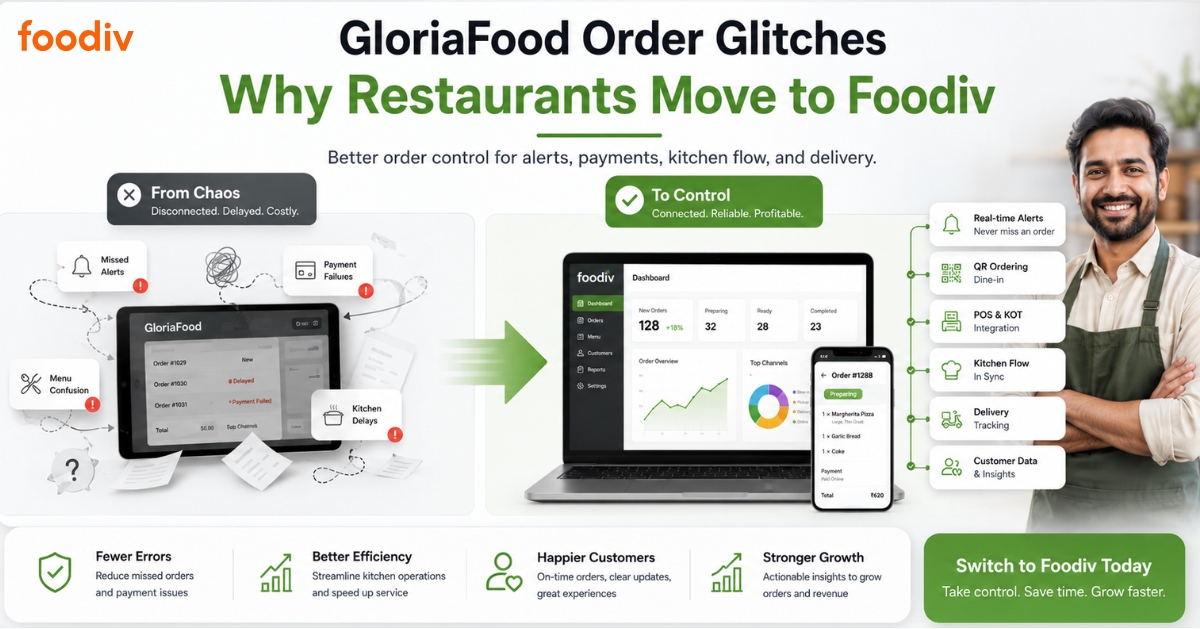
Foodiv helps restaurants avoid these problems by giving them better control over online orders, pickup, delivery, QR ordering, menu items, modifiers, payment status, customer data, POS, and KOT workflows. Instead of depending on disconnected steps, restaurants can manage their ordering flow from one clearer system.
This guide breaks down the order processing and integration issues restaurants should watch for when moving away from GloriaFood, and how Foodiv helps create a more reliable ordering setup before the shutdown creates pressure.
Why GloriaFood Users Are Moving Toward More Reliable Restaurant Ordering Systems
GloriaFood users are not just looking for a new online ordering tool anymore. They are looking for stability.
That shift makes sense. When a platform is being discontinued, restaurants cannot afford to wait until the final months and then rush the move. Online ordering is too close to daily revenue. If orders stop coming in properly, the problem is not technical anymore. It becomes a business problem.
Here’s the thing. A GloriaFood replacement should not only copy the old setup. It should improve the way orders move through the restaurant.
Restaurants need to check how the next platform handles incoming orders, menu changes, payment status, customer details, kitchen tickets, pickup orders, delivery rules, and dine-in QR orders. These pieces are connected. If one part does not work clearly, staff members waste time fixing mistakes instead of serving customers.
A rushed migration can also create avoidable errors. Menus may move without the right modifiers. Delivery zones may not match the old setup. Payment methods may need extra testing. Pickup times, taxes, discounts, and order notifications can also get missed if the restaurant moves too quickly.
What this really means is simple. GloriaFood users should not wait until the pressure builds. They should use this migration as a chance to choose a system that gives them better order control from day one.
Foodiv helps restaurants move in that direction. It gives restaurants a clearer way to manage online orders, pickup, delivery, QR ordering, POS, KOT, customer data, and menu settings. So instead of replacing GloriaFood with another basic order-taking tool, restaurants can move to a platform built for more reliable daily operations.
Common Order Processing Glitches Restaurants May Face with GloriaFood
Not every restaurant will face the same issues, but GloriaFood users should still review how their order flow works before migration. Small gaps in notifications, menu setup, payment status, or kitchen handling can quickly affect customer experience and daily revenue.
Missed or Delayed Order Notifications
A missed order notification can create a chain reaction inside the restaurant. The customer expects food preparation to start right away, but the staff may only notice the order after several minutes.
That delay affects prep time, delivery time, and customer trust. In busy hours, even one missed alert can lead to late food, cancellation requests, refund pressure, negative reviews, or lost repeat orders. This is why restaurants need a system where incoming orders appear clearly and staff can act without constantly checking different screens.
Manual Order Acceptance Problems
Manual order acceptance works only when staff members stay alert all the time. That sounds simple, but restaurants are busy places. Staff may be handling walk-in customers, phone orders, kitchen coordination, packing, payments, or delivery drivers at the same time.
When the workflow depends too much on manual checking, online orders can sit unnoticed. Restaurants need a setup where order acceptance feels clear, fast, and easy for the team. The fewer steps staff need to take, the lower the chance of missed or delayed processing.
Confusion Between Pickup, Delivery, and Dine-In Orders
Pickup, delivery, and dine-in orders need different handling. A delivery order may need driver assignment, delivery fee, customer address, and packaging. A pickup order needs accurate collection time. A dine-in QR order needs table details and faster kitchen routing.
When the order type is not clear, staff can prepare the wrong packaging, quote the wrong wait time, or send the order to the wrong workflow. This creates delays for customers and extra pressure for the kitchen. Restaurants should make sure their next system separates each order type clearly from the moment the order arrives.
Menu Item, Modifier, and Add-On Mismatch
Menu setup is one of the most common places where online ordering errors happen. A restaurant menu is rarely just item name and price. Pizzerias need sizes, toppings, crust options, sauces, and extras. Cafes need milk choices, add-ons, sugar levels, and item availability. Combo meals may need side items, drinks, and upgrade options.
If modifiers, add-ons, or item availability do not match the real kitchen setup, customers may order something the restaurant cannot prepare correctly. This leads to phone calls, corrections, refunds, or unhappy customers. A reliable ordering system should give restaurants clear control over menu categories, variants, toppings, combos, and availability.
Payment Status Confusion
Restaurants need to know the payment status before they prepare the order. A clear system should show whether the order is paid online, unpaid, cash on delivery, failed, refunded, or pending.
Without that clarity, staff may prepare unpaid orders by mistake or delay paid orders while trying to confirm payment. This creates confusion at the counter, during delivery, and inside the kitchen. Payment visibility matters because it directly affects trust, order speed, and cash handling.
Delivery Zone and Minimum Order Errors
Delivery settings need careful control. Restaurants often set delivery zones, minimum order values, delivery charges, free delivery rules, and service areas based on distance, staff capacity, or location limits.
If these settings are not configured correctly, customers may place orders from areas the restaurant does not serve. The restaurant may also charge too little for delivery or accept orders below the minimum value. These small setup mistakes can reduce profit and create avoidable conflict with customers. Restaurants should review delivery zones and minimum order rules before going live on any new platform.
Kitchen Ticket and Printing Issues
The kitchen needs clean, complete order tickets. A good ticket should show the item name, quantity, modifiers, add-ons, special notes, order type, customer instructions, and preparation priority.
If kitchen tickets are unclear or printing does not work properly, staff may miss important details. A burger may go out without the requested add-on. A pizza may miss a topping. A customer allergy note may not reach the kitchen. That is a serious operational risk. Restaurants should test kitchen tickets and printing before relying on any ordering system during live service.
Multi-Location Order Routing Issues
Multi-location restaurants need stronger order control than single-location restaurants. Each branch may have different menus, prices, delivery zones, opening hours, staff members, pickup times, and item availability.
If orders do not route to the right location, the wrong branch may receive the order or the customer may choose a location that cannot prepare it. This affects delivery timing, customer communication, kitchen planning, and reporting. Restaurant chains need a system that supports branch-wise menus, location-specific pricing, delivery rules, order dashboards, and clear staff access.
Integration Glitches That Can Break Restaurant Order Flow
A restaurant ordering system does not work alone. It has to connect with POS, KOT, payments, delivery, website ordering, customer records, and reporting without creating extra work for the staff.
POS Integration Gaps
Online orders should connect smoothly with the restaurant’s POS or billing workflow. When that connection is weak, staff may need to copy order details manually from one system to another.
That is where mistakes start. Wrong item entries, missing modifiers, duplicate billing, delayed receipts, and cash register confusion can all happen when the POS and online ordering system do not speak clearly to each other. A restaurant needs a setup where online orders move into billing with accurate item details, taxes, discounts, payment status, and order type.
KOT and Kitchen Display Issues
The kitchen needs order details fast and in the right format. Once a customer places an order, the details should move clearly from checkout to the kitchen ticket or kitchen display.
If this flow breaks, the kitchen may receive incomplete information. Staff may miss toppings, sauces, cooking notes, allergy instructions, or combo details. This creates delays and forces the front desk to go back and confirm the order. A clear KOT flow helps the kitchen prepare food faster and reduces back-and-forth between staff members.
Payment Gateway Integration Problems
Payment status is one of the most important parts of online ordering. Restaurants need to know whether an order is paid, unpaid, pending, failed, refunded, or marked for cash payment.
If the payment gateway does not update order status properly, staff may prepare unpaid orders or hold paid orders by mistake. Customers may also receive unclear confirmation messages. This affects trust immediately. A reliable system should show payment status clearly before the restaurant accepts and prepares the order.
Website Ordering Widget Issues
Many restaurants depend on direct orders from their own website. That only works when the order button, menu widget, cart, and checkout flow work properly.
Broken order buttons, outdated menus, slow checkout pages, or confusing mobile layouts can reduce direct orders without the restaurant noticing right away. Customers rarely report these problems. They simply leave and order somewhere else. Restaurants need to test their website ordering flow often, especially before and after migration.
Delivery Partner or Driver App Gaps
Delivery orders need more than customer name and address. The restaurant also needs clear delivery assignment, order status, preparation time, driver updates, and customer communication.
When delivery integration is weak, staff may not know who is handling the order or when it leaves the restaurant. Drivers may arrive too early, too late, or without full order details. This affects food quality and customer satisfaction. A better setup gives restaurants more control over delivery flow, driver coordination, and real-time order updates.
Analytics and Customer Data Gaps
Restaurants need more than completed orders. They need to know who ordered, what they ordered, how often they come back, which menu items sell well, and where delays happen.
Without proper order history, customer records, repeat order data, and reports, restaurants make decisions based on guesswork. They cannot easily spot high-value customers, best-selling items, slow hours, failed orders, or delivery performance issues. A strong ordering system should help restaurants understand their business, not just accept orders.
How Foodiv Helps Restaurants Avoid These Order Processing Problems
Foodiv helps restaurants move away from disconnected order handling and gives them a more controlled way to manage daily operations. Instead of treating online ordering as a separate channel, Foodiv connects the key parts of restaurant order flow, from customer checkout to kitchen preparation, pickup, delivery, and repeat customer management.
Here’s how it helps restaurants reduce avoidable order processing issues.
Centralized Order Dashboard
Foodiv gives restaurants a single dashboard to view and manage incoming orders more clearly. Staff do not have to jump between different screens or depend only on manual checking during busy hours.
A centralized order dashboard helps the team track:
- New online orders
- Accepted and pending orders
- Pickup and delivery orders
- Dine-in QR orders
- Order status updates
- Customer details
- Payment status
- Special notes and item instructions
What this really means is simple. Staff can see what needs attention, act faster, and reduce the chance of missed or delayed orders.
Online POS and KOT Support
Foodiv supports online POS and KOT workflows, which helps restaurants manage billing and kitchen preparation with fewer manual steps. Once an order comes in, the restaurant can process it in a more organized way instead of rewriting order details or passing information verbally.
This matters because kitchen teams need clean instructions. A good KOT flow helps them see:
- Item names and quantities
- Modifiers and add-ons
- Special cooking notes
- Order type
- Preparation priority
- Customer instructions
When POS and KOT work together, staff can reduce billing mistakes, kitchen confusion, and missed item details. It also helps the front desk and kitchen stay aligned during rush hours.
QR-Based Ordering for Dine-In and Table Orders
Foodiv supports QR-based ordering for dine-in customers. Guests can scan a QR code, view the menu, select items, add modifiers, and place orders from their table.
This reduces pressure on waitstaff and cuts down manual order-taking errors. Instead of writing down orders and entering them later, restaurants can receive table orders directly through the system.
QR ordering is useful for:
- Dine-in restaurants
- Cafes
- Casual dining outlets
- Food courts
- Quick-service restaurants
- Busy weekend service
- Restaurants with limited staff
It also gives customers more control. They can browse the menu at their own pace, check add-ons, and place orders without waiting for staff during peak hours.
Pickup and Delivery Order Management
Pickup and delivery orders need different handling. Foodiv helps restaurants manage both order types with better visibility and control.
Restaurants can configure important details such as:
- Pickup timing
- Delivery availability
- Order preparation time
- Delivery charges
- Minimum order value
- Customer address details
- Order status updates
- Staff notifications
This helps restaurants avoid common issues like wrong pickup timing, unclear delivery instructions, and customer confusion. Staff can quickly identify whether an order is for pickup, delivery, or dine-in and prepare it accordingly.
For delivery orders, clear status updates also help restaurants manage customer expectations. For pickup orders, accurate timing helps reduce waiting and counter pressure.
Menu, Modifier, and Add-On Control
Restaurant menus are not simple. A pizza order may include crust type, size, toppings, sauces, and extra cheese. A cafe order may include milk choice, sugar level, add-ons, and custom notes. A combo meal may include sides, drinks, and upgrades.
Foodiv helps restaurants manage these details more clearly through better menu control.
Restaurants can handle:
- Menu categories
- Item prices
- Sizes and variants
- Add-ons
- Toppings
- Modifiers
- Combos
- Item availability
- Menu changes
- Special instructions
This reduces the risk of customers ordering items that are unavailable or selecting options that the kitchen cannot prepare properly. It also helps staff avoid phone calls, corrections, and refund situations caused by unclear menu setup.
Payment and Order Status Visibility
Before preparing an order, restaurants need to know whether the payment is clear. Foodiv helps restaurants view order and payment status more easily so the team can act with confidence.
Clear payment visibility helps staff understand whether an order is:
- Paid online
- Cash on delivery
- Pending
- Failed
- Cancelled
- Refunded
- Awaiting confirmation
This matters because payment confusion can slow down service. Staff may delay a valid paid order or start preparing an unpaid order by mistake. With clearer payment and order status visibility, restaurants can reduce confusion at the counter, in the kitchen, and during delivery.
Customer Data Ownership
Foodiv helps restaurants accept direct orders and keep better control over customer data. This is important because customer relationships should not depend only on third-party platforms or temporary ordering tools.
With customer data, restaurants can better understand:
- Who orders frequently
- What customers usually order
- Which menu items bring repeat business
- When customers are most active
- Which offers may bring them back
- How order history changes over time
Here’s the thing. Order processing is not only about completing today’s order. It is also about building tomorrow’s repeat order. When restaurants own their customer data, they can create better follow-ups, loyalty offers, and direct marketing without losing touch with their audience.
Multi-Location Control
Restaurants with multiple branches need more than a basic ordering setup. Each location may have different menus, prices, opening hours, delivery zones, staff members, and item availability.
Foodiv helps restaurant groups manage operations across branches with better control.
Multi-location restaurants can manage:
- Branch-wise menus
- Location-specific pricing
- Different delivery zones
- Pickup rules by location
- Opening and closing hours
- Item availability per branch
- Staff access
- Location-wise orders
- Branch-level reports
This helps reduce wrong-location orders, pricing mistakes, and delivery confusion. It also gives owners and managers a clearer view of how each branch performs.
For restaurant chains, cloud kitchens, franchise outlets, and multi-brand food businesses, this kind of control makes daily order management much easier.
GloriaFood vs Foodiv for Order Processing and Integrations
When restaurants compare GloriaFood and Foodiv, the real question is not just which platform can accept online orders. The bigger question is which system gives restaurants better control over order alerts, kitchen flow, payments, delivery, customer data, and long-term operations.
Here’s a clear comparison based on the order processing and integration areas restaurants should review before moving away from GloriaFood.
| Area |
GloriaFood Challenge |
How Foodiv Helps |
| Order alerts |
Orders may be missed or delayed if staff do not monitor incoming orders properly during busy hours. |
Foodiv gives restaurants a centralized order dashboard where staff can view, track, and manage incoming orders more clearly. |
| Kitchen workflow |
Manual handling can create delays when staff need to pass order details from the front desk to the kitchen. |
Foodiv supports Online POS and KOT workflows, helping restaurants send clearer order details to the kitchen. |
| QR ordering |
Restaurants may need better control over dine-in and table ordering workflows. |
Foodiv supports QR-based ordering, so customers can scan, browse the menu, and place table orders with fewer manual steps. |
| Menu control |
Modifier, add-on, item availability, and menu setup need careful handling to avoid wrong orders. |
Foodiv helps restaurants manage menu items, categories, sizes, toppings, add-ons, combos, modifiers, and item availability. |
| Payment status |
Restaurants need clear visibility into paid, unpaid, cash, failed, pending, or refunded orders. |
Foodiv helps staff view order and payment status more clearly before preparing or dispatching orders. |
| Delivery setup |
Delivery zones, minimum order values, pickup times, and delivery timing can create confusion if not configured properly. |
Foodiv helps restaurants manage pickup and delivery settings, including order types, preparation time, delivery rules, and order status. |
| Customer data |
Restaurants need better ownership of customer records, order history, and repeat order insights. |
Foodiv supports direct ordering, helping restaurants keep better control over customer data and repeat customer relationships. |
| Multi-location |
Branch-wise menus, pricing, delivery zones, opening hours, and order routing can become harder to manage at scale. |
Foodiv gives restaurant groups better control over multi-location orders, menus, pricing, staff access, and branch-wise operations. |
| Migration |
Restaurants need a long-term replacement that reduces order disruption during the move from GloriaFood. |
Foodiv helps restaurants plan GloriaFood migration with menu setup, order flow, payment settings, QR ordering, pickup, and delivery configuration. |
| Future reliability |
GloriaFood is being discontinued, so restaurants need to plan before order continuity becomes a risk. |
Foodiv is positioned as a long-term GloriaFood alternative for restaurants that want direct online ordering and stronger operational control. |
Signs Your Restaurant Needs a Better GloriaFood Alternative
Some restaurants can manage with a basic online ordering setup for a while. But once order volume grows, menu complexity increases, or staff starts depending on digital orders every day, small gaps become harder to ignore.
Here are the signs your restaurant should start looking for a better GloriaFood alternative.
- Your staff misses online order alerts.
If your team has to keep checking screens manually, orders can sit unnoticed during lunch rush, dinner service, or weekend peaks. A better system should make new orders easy to see, accept, and process without constant manual monitoring.
- Your kitchen team receives incomplete order details.
Missing modifiers, add-ons, special notes, or item instructions can slow down preparation and create wrong orders. Your kitchen needs clear tickets with every detail needed to prepare the food correctly the first time.
- Customers complain about late confirmations.
When customers place online orders, they expect quick confirmation. If they do not receive updates on time, they may call the restaurant, cancel the order, ask for a refund, or leave a poor review.
- Your delivery zones are hard to manage.
Delivery settings should be easy to control. If your team struggles with service areas, minimum order values, delivery fees, or timing rules, you may end up accepting orders from locations you cannot serve profitably.
- Your menu has too many modifiers for a basic setup.
Restaurants with pizzas, burgers, combos, drinks, toppings, sauces, sizes, and custom add-ons need stronger menu control. If your current setup makes modifiers confusing, customers may place incorrect orders or miss important options.
- Your payment status is not always clear.
Staff should know whether an order is paid online, pending, failed, unpaid, cash on delivery, or refunded before preparing it. Payment confusion can create delays at the counter, during dispatch, and inside the kitchen.
- You run multiple locations and need branch-wise control.
Multi-location restaurants need location-specific menus, pricing, opening hours, delivery zones, pickup rules, staff access, and reporting. If one dashboard cannot clearly manage branch-wise operations, order routing can become messy.
- You want to move before GloriaFood shuts down.
Waiting until the final deadline can create unnecessary pressure. Early migration gives you time to rebuild your menu, test payments, train staff, update website order buttons, check QR codes, and avoid order disruption.
- You want direct orders without depending on third-party delivery apps.
Third-party platforms can bring visibility, but restaurants also need control over direct orders, customer data, repeat business, and margins. A better GloriaFood alternative should help you accept orders through your own website and customer channels.
Why Foodiv Is a Strong GloriaFood Alternative for Restaurants That Need Order Control
Foodiv works well for restaurants that want more than a basic online order button. It helps restaurants manage the full order flow, from customer checkout to kitchen preparation, payment status, pickup, delivery, and repeat customer engagement.
Here’s the thing. A GloriaFood replacement should not only help restaurants continue taking online orders. It should help them run those orders with less confusion and more control.
Foodiv helps restaurants accept direct online orders through their own digital channels. That means restaurants can reduce dependence on third-party delivery apps and keep better control over customer relationships, order data, and margins.
It also supports QR ordering for dine-in and table orders. Customers can scan a QR code, browse the menu, add modifiers, and place orders without waiting for staff to take every detail manually. This helps reduce order-taking mistakes, especially during busy service hours.
For pickup and delivery orders, Foodiv gives restaurants better control over order type, preparation time, delivery settings, pickup timing, and order status. Staff can understand what needs to be prepared, packed, picked up, or delivered without guessing.
Foodiv also supports Online POS and KOT workflows, which helps front-desk and kitchen teams stay aligned. Orders can move more clearly from the customer to the restaurant team, then to the kitchen. This reduces manual handling and helps avoid missed item details, unclear notes, or delayed preparation.
Foodiv is also useful for restaurants with complex menus. It helps manage:
- Menu categories
- Item prices
- Sizes and variants
- Toppings
- Add-ons
- Modifiers
- Combos
- Item availability
- Special instructions
This matters for pizzerias, cafes, burger shops, takeaways, and cloud kitchens where one order can include several custom choices. Better menu control means fewer wrong orders and fewer correction calls.
Another important advantage is customer data ownership. With direct ordering, restaurants can understand who orders often, what they prefer, and how they come back. That gives restaurants more room to build repeat business through offers, loyalty, and direct communication.
Foodiv is a practical GloriaFood alternative for:
- Independent restaurants
- Pizzerias
- Cafes
- Takeaway restaurants
- Food trucks
- Cloud kitchens
- Multi-location restaurant brands
- Restaurants with heavy pickup and delivery volume
- Restaurants that want direct online ordering control
What this really means is simple. Foodiv is not just another ordering tool. It gives restaurants a more complete way to manage orders, menus, payments, kitchen workflows, customer data, and location-level operations after moving away from GloriaFood.
Final Verdict: Should Restaurants Move from GloriaFood to Foodiv?
Yes, GloriaFood users should start planning their move to Foodiv early. Waiting until the last moment can create avoidable problems with menu setup, payment testing, staff training, delivery settings, and website order buttons.
Foodiv is a strong GloriaFood alternative for restaurants that need better control over online orders, QR ordering, pickup, delivery, POS, KOT, payment status, customer data, and menu management.
The main goal should not be just replacing GloriaFood. It should be moving to a system that helps restaurants avoid missed orders, manual handling, menu mistakes, and rushed migration stress.
FAQs
Common GloriaFood order processing issues may include missed order alerts, delayed confirmations, menu setup errors, unclear payment status, delivery zone mistakes, and manual kitchen workflow gaps. These problems become more serious when a restaurant depends on online orders for daily sales.
Restaurants should replace GloriaFood early because online ordering directly affects revenue. Waiting too long can lead to rushed menu migration, broken website order buttons, payment setup delays, staff confusion, missed orders, and poor customer experience during the switch.
Foodiv helps restaurants manage incoming orders through a centralized order dashboard. Staff can view, accept, process, and track orders more clearly across pickup, delivery, dine-in, and QR ordering workflows, which reduces the chance of missed or delayed orders.
Yes. Foodiv supports Online POS and KOT features that help restaurants manage billing and kitchen order tickets. This helps staff send clear order details to the kitchen and process orders with fewer manual steps.
Yes. Foodiv works well for restaurants that manage modifiers, add-ons, toppings, item sizes, combos, categories, prices, and item availability. It is useful for pizzerias, cafes, takeaways, cloud kitchens, and multi-location restaurants.
Yes. Foodiv supports pickup, delivery, dine-in, and QR-based ordering. This helps restaurants manage different order types from one system and gives staff better control over timing, preparation, order status, and customer instructions.
Restaurants should test menu items, modifiers, checkout flow, payment status, pickup timing, delivery zones, QR codes, customer notifications, staff alerts, kitchen tickets, and website order buttons before going live with Foodiv.